Trade Copilot
Trade Copilot is an advanced trade assistant designed to give you extra data and insights for your trading. It is powered by machine learning and advanced algorithms that are based
Overview#
Trade Copilot is a trade assistant that gives you extra data and insights for your trading. It uses machine learning and algorithms based on statistics and probabilities. This tool is adaptive and dynamic, so it continues to learn and improve over time.
Trade Copilot includes two main features to help you analyze the market:
- Detect Reversals: Spots potential market reversals based on the oscillator's movement.
- Detect Impulse: Flags large market moves before they happen, giving you an early warning.

Detect Reversals#
Overview#
The Detect Reversals feature identifies potential turning points in the market. When it detects a possible reversal, it displays a triangle on your chart. The visibility of the triangle tells you about the signal's importance:
- More visible triangle: a more significant, higher-confidence reversal signal.
- Less visible triangle: a less significant, lower-confidence reversal signal.
This lets you quickly see how strong a potential reversal might be.

Settings#
You can adjust the reversal detection settings to fit your trading style.
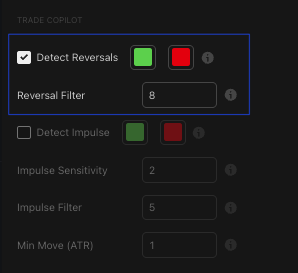
| Setting | Description |
|---|---|
| Reversal Detection | Turns the reversal detection signals on or off. When enabled, it highlights potential market reversals. |
| Reversal Filter | Controls how often signals appear and their confidence level. A lower number gives more reversal signals with lower confidence. A higher number gives fewer, higher-confidence signals. |
Best Practices & Usage#
- Confirm with signal strength: Pay closer attention to the triangles that are more visible, since they show higher-confidence reversal points.
- Combine with other tools: Use the reversal signals along with other indicators to confirm your trading idea. A reversal signal in a key liquidity zone is often stronger.
- Adjust the filter for your style:
- Day traders and scalpers: use a lower filter setting (for example, 4-7) to see more potential opportunities.
- Swing and position traders: use a higher filter setting (for example, 8-10) to focus on the most significant, confirmed reversal points.
Detect Impulse#
Overview#
The Detect Impulse feature uses AI to flag when a large market move is about to occur. It displays a diamond on your chart to signal a potential impulse move. Like the reversal signals, the visibility of the diamond shows its importance:
- More visible diamond: a higher-confidence signal of a significant market move.
- Less visible diamond: a lower-confidence signal.
This feature helps you prepare for major price swings before they happen.

Settings#
You can configure the impulse detection to match your market outlook and risk tolerance.
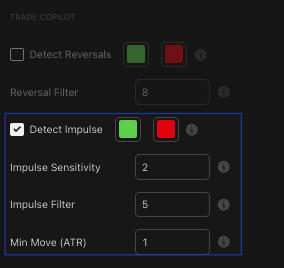
| Setting | Description |
|---|---|
| Detect Impulse | Turns the AI impulse detection on or off. When enabled, it flags large trend movements using statistical analysis. |
| Impulse Sensitivity | Controls how far ahead the signal looks and how reactive it is. A lower number targets shorter-term moves (for example, 2-5 candles ahead) and is more reactive. A higher number targets longer-term moves (for example, 10-20 candles ahead) and is more stable. |
| Impulse Filter | Controls the sensitivity and confidence of the impulse signal. A lower number gives more frequent signals with lower confidence. A higher number gives fewer signals with higher confidence. |
| Min Move (ATR) | Sets the minimum size of the expected move for an impulse signal, measured in ATR (Average True Range) units. A lower number detects smaller potential moves. A higher number detects only larger ones. |
Best Practices & Usage#
- Anticipate market moves: Use the diamond signals to prepare for potential breakouts or trend continuations. A visible diamond can serve as a warning to tighten stops or look for an entry.
- Set your signal timeframe: Adjust the Impulse Sensitivity based on your trading style. If you are a short-term trader, use a lower value. If you are a long-term trader, a higher value gives you a better view of larger moves.
- Filter for quality: Use the Impulse Filter to decide if you want more signals or higher-quality signals. A higher filter setting helps you avoid noise and focus on more reliable signals.
- Define move size: Use the Min Move (ATR) setting to tell the indicator what size of move you consider significant. This helps filter out minor fluctuations and focuses on the moves that matter to your strategy.